

Manage the emails you receive from Familyrelatives
Managing the emails you receive from Familyrelatives is easy
Take charge of your Familyrelatives experience by determining how often you receive communications and the topics we contact you about. Our primary mode of contact is through email, and you have the flexibility to select your preferences.
Follow these easy steps to customize your email settings:
- If you're not already logged in, access Familyrelatives using your email address and password.
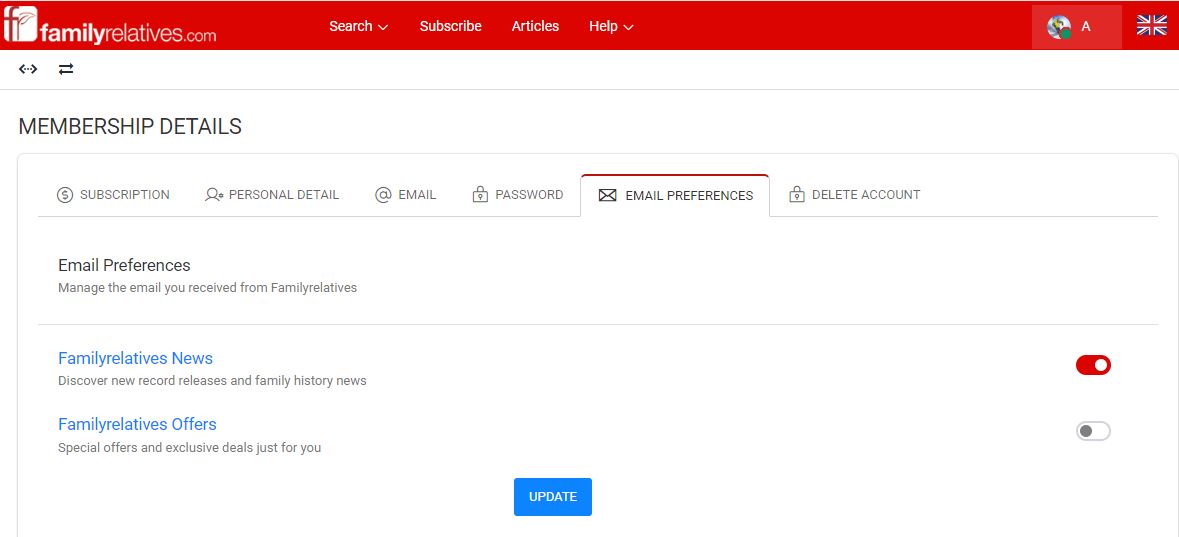
- Navigate to "My Account" and select "Email Preferences."
- Tailor your email preferences by adjusting the toggles. If red it’s good to go. Don’t want to receive any non-essential emails make sure they are greyed out.
- Once finished select the ‘Update Personal Details’ button
You have the option to choose from various types of emails:
If you wish to discontinue all Familyrelatives emails, simply select use the toggles and switch everything off.
By unsubscribing, you'll only receive essential emails about your account from us.
You might also like
Does my subscription automatically renew
Does Familyrelatives.com automatically renew my subscription?...
25-Nov-2023
About Familyrelatives
What We Offer
Family Records
Help and Guidance
Connect with us ⌄
Legal Center
 familyrelatives.com
Copyright © 2026 Familyrelatives